LMS
LMS
Last updated on 23rd May 2026| 4576

- Introduction to Hugging Face Tutorial For Freshers
- Getting Started with Installation
- Core Concepts of Hugging Face
- Working with Transformers Library
- Datasets and Tokenization
- Pretrained Models and Fine‑Tuning
- Pipelines and Inference
- Integration with External Tools
- Real‑World Applications
Introduction to Hugging Face Tutorial For Freshers
Hugging Face is a leading open-source platform that makes working with AI and NLP models simple and accessible. It provides thousands of pretrained models for tasks like text classification, summarization, and translation. Beginners benefit from its user-friendly libraries such as Transformers and Datasets. The platform emphasizes collaboration through its Model Hub, where developers share models and datasets in Gen AI Course . Hugging Face integrates seamlessly with PyTorch and TensorFlow, making it versatile for different workflows. Freshers can quickly experiment with pipelines to run tasks in just a few lines of code. The tutorial introduces the importance of tokenization, fine-tuning, and inference. Hugging Face bridges the gap between theoretical AI concepts and practical implementation. It empowers learners to build real-world applications without reinventing the wheel. By starting here, freshers gain confidence in exploring modern AI tools and workflows.

Getting Started with Setup
- Python Environment: Install Python 3.8 or later and use Jupyter Notebook or Google Colab to write, test, and experiment with machine learning and NLP models in an interactive environment.
- Transformers Library: Install the Hugging Face Transformers library using pip to access pre-trained models for tasks such as text classification
Get Your Gen AI Certification by Learning from Industry-Leading Experts and Advancing Your Career with ACTE’s Gen AI Course.
Core Concepts of Hugging Face
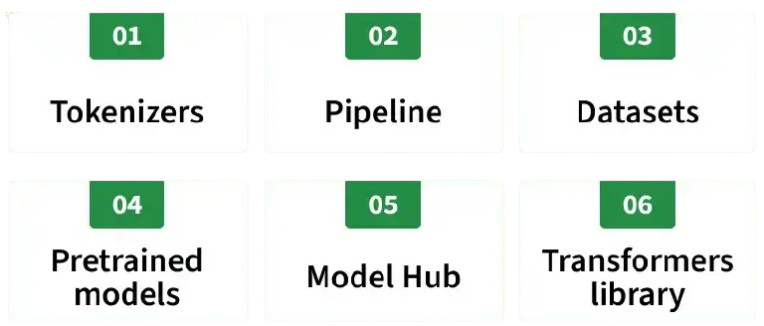
Hugging Face is built around a few core concepts that freshers must understand. At its heart are models, which perform tasks like classification or translation. These models rely on tokenizers to convert text into numerical representations. Datasets provide the raw material for training and evaluation. The Transformers library acts as the central hub, connecting models, tokenizers, and datasets. Hugging Face also introduces pipelines, which simplify running tasks with minimal code in Gen AI Course. Another key concept is the Model Hub, a repository where developers share pretrained models. Collaboration and openness are emphasized, making it easy to learn from others. Hugging Face supports multiple frameworks, ensuring flexibility. These concepts form the foundation for practical experimentation. By mastering them, freshers gain confidence in building real-world AI applications.
Working with Transformers Library
- Installation: Install the Hugging Face Transformers library using pip to access powerful pre-trained NLP models. The simple setup enables beginners to start building AI applications and experimenting with transformer models quickly.
- Model Loading: Load pre-trained models using the
from_pretrained()method, allowing developers to perform tasks such as text classification, translation, summarization, and question answering with minimal code. - Tokenization: Tokenizers convert raw text into numerical tokens that transformer models can understand. Hugging Face provides fast, multilingual tokenizers that improve model performance and text-processing accuracy.
- Training: Fine-tune pre-trained transformer models on custom datasets using PyTorch or TensorFlow. Beginners can also enhance their AI development skills by exploring the Intelligent Apps Tutorial, which covers practical AI application development.
- Inference: Hugging Face pipelines simplify model inference by allowing developers to generate predictions for tasks such as sentiment analysis, text generation, named entity recognition, and summarization with just a few lines of code.

Datasets and Tokenization
Datasets and tokenization are fundamental components of natural language processing (NLP) with Hugging Face. The Hugging Face Datasets library provides access to thousands of high-quality, ready-to-use datasets for tasks such as text classification, translation, summarization, and question answering. Before training a model, raw text is preprocessed through tokenization, where text is converted into numerical tokens that transformer models can understand. Hugging Face Tokenizers efficiently handle subword tokenization, padding, truncation, and multilingual text processing, ensuring consistent performance during both training and inference. To expand your AI knowledge, explore the Object Detection Tutorial. Mastering datasets and tokenization helps beginners build accurate NLP models, improve preprocessing workflows, and develop the practical skills required for fine-tuning and deploying transformer-based applications.

Get JOB Oriented Gen AI Training for Beginners By MNC Experts
- Instructor-led Sessions
- Real-life Case Studies
- Assignments
Pretrained Models and Fine-Tuning
- Model Hub: Hugging Face Model Hub provides thousands of pre-trained models for natural language processing, computer vision, audio, and multimodal AI applications. Beginners can quickly discover and use models for a wide range of real-world tasks.
- Loading Pretrained Models: Pre-trained models can be loaded easily using the
from_pretrained()method, allowing developers to perform tasks such as text classification, translation, summarization, and question answering without training models from scratch. - Fine-Tuning Basics: Fine-tuning adapts pre-trained models to domain-specific tasks using custom datasets, improving prediction accuracy and performance. To strengthen your understanding of deep learning concepts, explore the Artificial Neural Network: A Complete Guide Tutorial.
- Transfer Learning: Hugging Face models leverage transfer learning by reusing knowledge learned from large datasets, significantly reducing training time, computational resources, and the amount of labeled data required for new applications.
- Evaluation: After fine-tuning, models are evaluated using performance metrics such as accuracy, precision, recall, F1-score, and validation loss. Hugging Face integrates seamlessly with PyTorch and TensorFlow to ensure reliable model performance before deployment.
Want to Master Gen AI? Explore the Gen AI Master Program Offered at ACTE Today!
Pipelines and Inference
Pipelines and inference are fundamental concepts in generative AI that enable efficient processing and deployment of machine learning models. A pipeline refers to the structured workflow that manages tasks such as data preprocessing, model loading, input handling, inference execution, and output generation. It simplifies the interaction between users and AI models by automating multiple steps within a single framework and Generative AI Tutorial. Inference is the process of using a trained model to generate predictions, responses, or content based on new input data. During inference, the model applies the knowledge learned during training to produce meaningful outputs without updating its parameters.
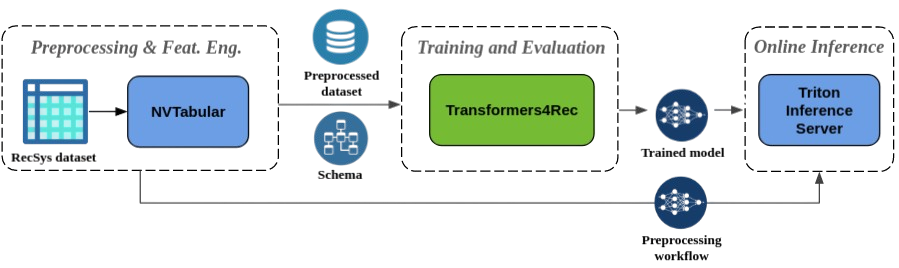
Understanding pipelines helps freshers build scalable AI applications by streamlining model integration and deployment. Popular AI frameworks provide pre-built pipelines for tasks such as text generation, summarization, translation, sentiment analysis, and image creation, reducing development complexity. Learners gain practical experience in optimizing model performance, managing resources, and improving response times in Gen AI Course . Knowledge of inference techniques also helps in selecting appropriate hardware, reducing latency, and ensuring efficient deployment in real-world environments. Together, pipelines and inference form the backbone of modern AI applications, allowing developers to deliver reliable, high-performance solutions across industries such as healthcare, finance, education, customer support, and content creation.
Want to Learn About DevOps? Explore Our DevOps Interview Questions and Answers Featuring the Most Frequently Asked Questions in Job Interviews.
Integration with External Tools
- PyTorch Integration: Hugging Face integrates seamlessly with PyTorch, allowing developers to fine-tune, train, and deploy transformer models using flexible training workflows. To strengthen your AI fundamentals, explore the Generative AI Basics to Advanced Tutorial.
- TensorFlow Integration: Hugging Face also supports TensorFlow, enabling developers to build, train, and deploy NLP and deep learning models across multiple machine learning frameworks while expanding their technical expertise.
- Cloud Platform Integration: Hugging Face works with leading cloud platforms such as AWS, Microsoft Azure, and Google Cloud Platform (GCP), making it easy to deploy scalable AI applications. Learn more through the Generative AI Tutorial: Introduction and Basics.
- API Integration: Hugging Face provides powerful Inference APIs and Hub APIs that enable developers to integrate pre-trained models into web, mobile, and enterprise applications with minimal development effort.
- External Library Support: Hugging Face integrates with popular Python libraries such as Scikit-learn, SpaCy, Pandas, and Datasets, allowing developers to build complete machine learning pipelines for preprocessing, training, evaluation, and deployment.
AI Sample Resumes! Download & Edit, Get Noticed by Top Employers! DownloadReal-World Applications
Hugging Face Tutorial For Freshers is used in countless real-world scenarios. In healthcare, models assist with medical text analysis. In finance, they power sentiment analysis for market predictions. Education benefits from automated summarization and translation. Entertainment uses Hugging Face for chatbots and content generation. Businesses apply it to customer support and document processing. Startups leverage Hugging Face for rapid prototyping. Governments use it for language translation and policy analysis in Gen AI Course. Hugging Face also supports research in cutting-edge AI. Freshers see how their learning applies to industry needs. These applications prove Hugging Face’s relevance across domains.